
Welcome to the documentation page for the WooCommerce Balíkobot plugin, which connects your e-shop with the Balíkobot.cz system. You can purchase the Balíkobot plugin here: Toret Balíkobot for WooCommerce
- Plugin Installation
- Plugin Activation
- Plugin Settings (Video Tutorial)
- Initial Setup of the Balíkobot Plugin
- Pairing Shipping Methods in the E-shop with the Plugin
- Principles of Data Configuration, Editing in Orders
- Settings for SDS carrier (Nastavení pro dopravce SDS)
- Generating Labels for Carriers Individually
- Bulk Label Generation for Carriers
- Sending Data to Carriers
- Tracking Balíkobot Shipments in WooCommerce
- Support for Other Plugins
- Task Automation
- Branch Selector Widget Settings
- Actions and Filters
- Plugin testing
Plugin Installation
Upon purchasing the plugin, you will receive a license key and a download link for the plugin zip file via email. You can find detailed instructions on how to install the plugin from your computer into WordPress here.
Plugin Activation
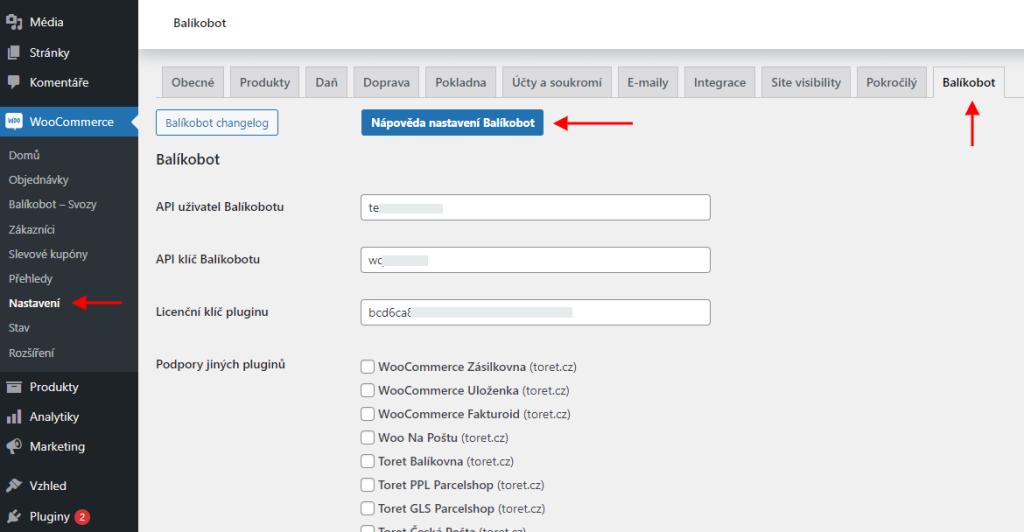
After installing the plugin, open the plugin settings, insert the license key into the appropriate field, and save.
Plugin Settings (Video Tutorial)
The following series of videos guides you through the setup and usage of the Balíkobot plugin step by step. Help is also available directly in the Balíkobot plugin settings (WooCommerce > Settings > Balíkobot).
Initial Setup of the Balíkobot Plugin
Pairing Shipping Methods in the E-shop with the Plugin
Principles of Data Configuration, Editing in Orders
Settings for SDS carrier (Nastavení pro dopravce SDS)
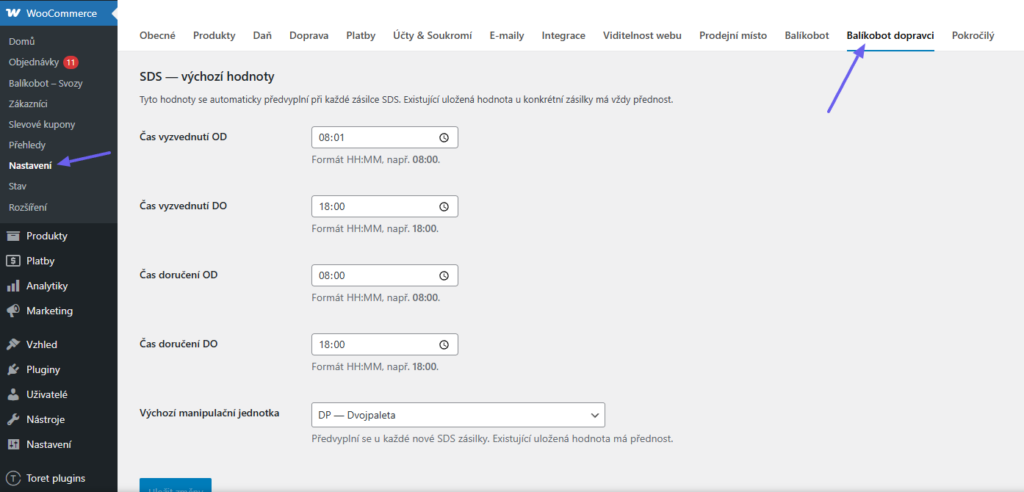
To ship with the SDS carrier, it is necessary to configure additional supplementary data. These details can be set while sending each individual shipment, or you can enter default values that will be applied automatically every time.
You can enter these default values in the WooCommerce settings under the Balíkobot carriers (Balíkobot dopravci) > SDS.
Generating Labels for Carriers Individually
Bulk Label Generation for Carriers
Sending Data to Carriers
Tracking Balíkobot Shipments in WooCommerce
Support for Other Plugins
Task Automation
Branch Selector Widget Settings
To select branches at checkout, you must configure the widget display for individual carriers. This is done in the Balíkobot plugin settings.
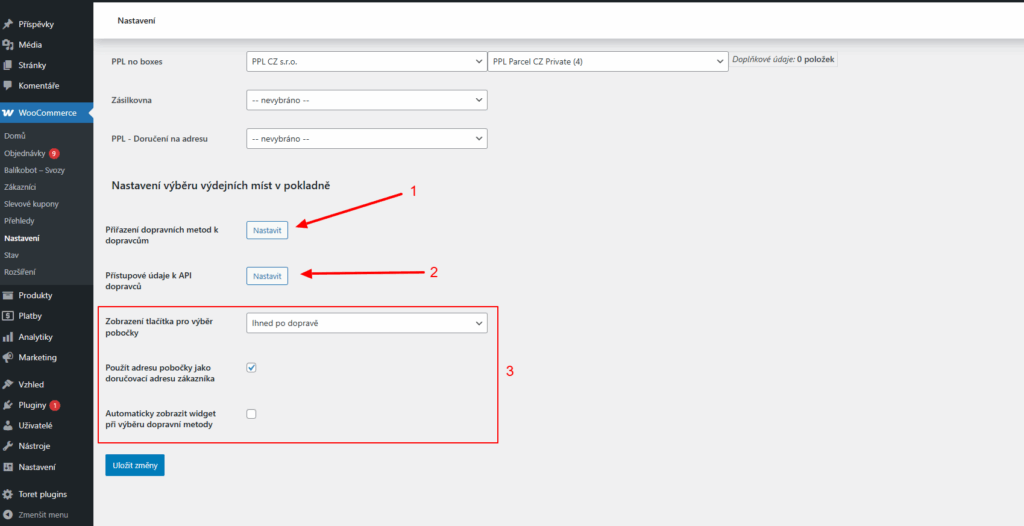
1. First, you must assign individual carriers from the menu to your shipping methods.
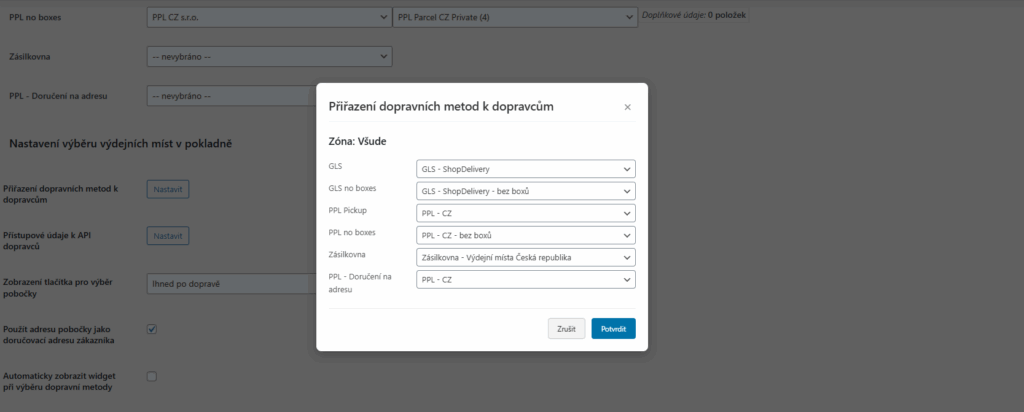
2. Subsequently, you must enter access credentials for individual carriers to allow map widgets to load. You obtain these credentials directly from the contracted carriers.
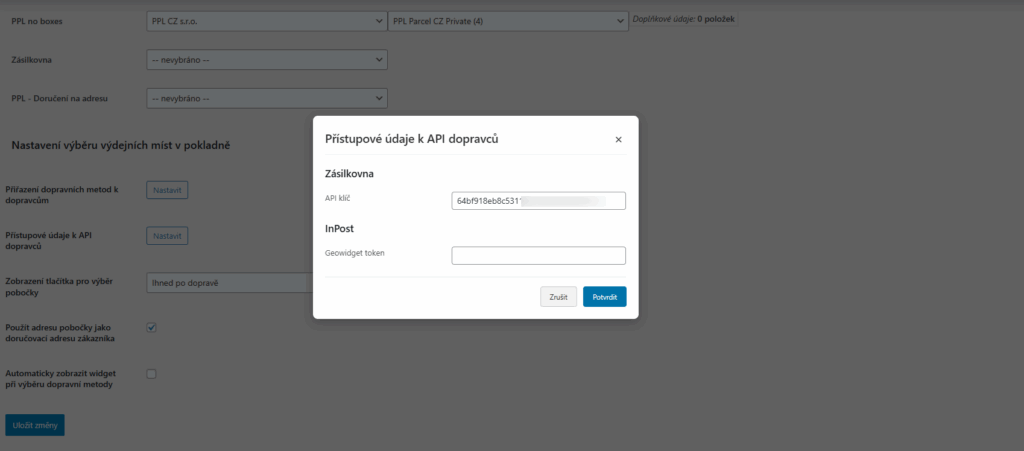
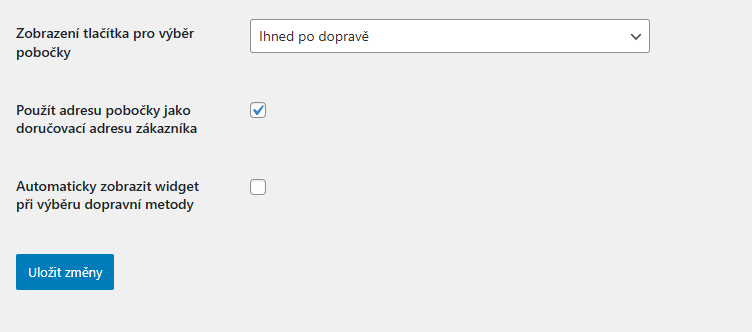
3. Furthermore, you can adjust the location of the button to open the widget, use the branch address as the delivery address, and enable automatic opening of the widget.
Loading Branches
(WooCommerce > Settings > Balíkobot > Pobočky k dopravám)
For customers to see up-to-date branches at checkout, the branches need to be loaded from Balíkobot.
Manual loading: in the list, select the carriers whose branches you want to update. To select multiple carriers, hold down the Ctrl key. Then click Načíst položky (Load items). If you do not select any carrier, the branches of all carriers are updated. The carriers are loaded one after another and the progress is shown right below the button. Loading also handles very large branch lists, such as DPD Pickup with 150,000 locations.

Automatic loading via cron: to update branches regularly, set up a cron job on your hosting with this address:
https://vasedomena.cz/wp-json/toret-balikobot/v1/reload-branches
If you want to update only selected carriers, add the carriers parameter with carrier codes separated by commas, for example:
https://vasedomena.cz/wp-json/toret-balikobot/v1/reload-branches?carriers=kod1,kod2
If the cron starts loading again before the previous run has finished, the new run does not start. This way, the plugin prevents simultaneous loading.
Important! If your cron is set to the original srv/updateBranches.php file, change it to the new address. The old file still works for now, but it is deprecated and will be removed in one of the next versions.
Actions and Filters
The WooCommerce Balíkobot plugin adds several actions and filters that can be used to modify its behavior or be utilized, for example, in a template.
Note: In some filters, an object of the class WBAL_Order is passed as a parameter. This is a simple object representing a single order. For your purposes, you will likely prefer the WC_Order object, i.e., the standard WooCommerce representation of an order. You can obtain it easily. If $order is a WBAL_Order object representing an order, then the WC_Order of this order can be obtained as $order->wc_order.
Actions
- woocommerce_balikobot_loaded – Called immediately after plugin initialization on every page load.
Definition: do_action( ‘woocommerce_balikobot_loaded’ );
- wbal_label_created – Called upon successful label creation.
Definition: do_action(‘wbal_label_created’, array(‘carrier_ids’ => $m_cid, ‘order’ => $order));
The single parameter contains information about this label. It is an array with keys
‘carrier_ids’ – array of carrier IDs for all labels created by the label creation operation (there may be several in a multi-package shipment).
‘order’ – object of the WBAL_Order class representing the order for which the label was just generated.
Filters
- wbal_add_operation_item – Called upon a label creation request, before sending data to Balíkobot. Allows changing data sent to Balíkobot for the ADD operation. In case of a multi-package shipment, the filter is called only for data regarding the first (base) item. Definition: $item = apply_filters(‘wbal_add_operation_item’, $item, $wbal_order); $item is data for Balíkobot – an array with string keys. The keys correspond to data items of the ADD operation described in the Balíkobot API documentation.
$wbal_order is an object of the WBAL_Order class, representing the order we are sending to Balíkobot. The filter should return possibly modified $item data. - wbal_add_operation_all_items – Called upon a label creation request, just before sending data to Balíkobot. Allows changing data sent to Balíkobot for the ADD operation. Unlike wbal_add_operation_item, this filter is called on the complete data sent to Balíkobot – It is, therefore, an array of one, or (in the case of a multi-package shipment) several sets of data of the same type as $item in wbal_add_operation_item. Definition: $result = apply_filters(‘wbal_add_operation_all_items’, $result, $wbal_order); $result is an array of data for ADD.
$wbal_order is an object of the WBAL_Order class, representing the order we are sending to Balíkobot. The filter should return $result data, possibly modified. - wbal_objednavka_prefill – Called immediately after a customer places a new order. Our plugin assigns Balíkobot properties to the order – carrier, service, branch, and additional data – based on settings. It then calls this filter, which can be used to modify properties before they are saved to the order. A typical use case is, for example, adding shipment weight to additional data based on ordered goods. Definition: $defs = apply_filters(‘wbal_objednavka_prefill’, $defs, $order_id);
$defs are values of carrier, service, and branch that the automatic pre-filling system would assign to the order (according to settings). It is an array with keys ‘wbal_carrier’ (carrier code), ‘wbal_service’ (service code), ‘wbal_branch’ (branch id), ‘addit’ (array of additional data) $order_id is the order ID. The filter should return $defs, possibly modified, to pre-fill something else. - wbal_tracking_url – Filter that returns the URL for shipment tracking based on the order ID. Using the filter, this URL can be changed, but that usually makes no sense. You will usually rather call this filter (apply_filters()) e.g., from an email template to obtain the URL. Definition: $url = apply_filters(‘wbal_tracking_url’, $order_id) $order_id is the id of the order for which the tracking URL should be returned.
Additional Data
Whenever a label is generated (which also means creating an order in Balíkobot), a set of data describing the shipment needs to be sent to Balíkobot. Basic data includes the required carrier, their service, and potentially a branch. Our plugin automatically adds other typically required data to them, such as delivery address, COD price, and similar. However, the e-shop may want to use other carriers or services that require additional specific data items (e.g., shipment dimensions, weight, customs info, etc.). Additional data is used to supply these data items.
Additional data is stored as a meta record attached to the order under the key “wbal_addit”. The value of this meta record is an associative array. The array contains key:value items, where several types of keys can be used:
- _key (starts with _, e.g., _autosizes) – these are special keys evaluated in our plugin before sending data to Balíkobot, which add one or more additional items to the data for Balíkobot. E.g., _autosizes (with value 1 or true) causes automatic insertion of data items width, length, and height with dimensions according to the sizes of items in the shipment.
- key#2 (normal text not starting with _, but containing # and a number at the end) – keys that are transferred directly to Balíkobot data WITH their value, but without the trailing # and number. The number indicates into which package of a multi-package shipment the data should be transferred. So e.g., weight#2: 10 means passing the data item “weight” with value 10 to the second package of a multi-package shipment. In this way, e.g., the weight of each individual package of a multi-package shipment can be specified.
- key#a (after # is “a”, not a number) – keys written to all packages of a multi-package shipment. E.g., weight#a: 10 means that every package of a multi-package shipment will have a declared weight of 10.
- key (does not start with _ and does not contain #) – is the same as key#1 . It is, therefore, a shorter and simpler notation for a key to be inserted into the first package of a multi-package shipment. If you are not sending multi-package shipments, you can use these keys directly for clarity and simplicity.
Which data items you want to pass to Balíkobot (and thus which keys you need to have in additional data) can be found in the Balíkobot manual, in the description of the ADD operation for your carrier.
Our plugin automatically fills in these data items (so these items DO NOT NEED to be entered into additional data):
- service_type – according to selected service
- branch_id – according to selected branch, if any
- order_number – automatically starting from 1 according to pieces in multi-package shipment
- cod_price – for COD, price of the entire order
- cod_currency – for COD, currency of the order
- vs – variable symbol according to order number in e-shop
- rec_name – according to delivery address
- rec_firm – according to delivery address
- rec_email – according to delivery address
- rec_phone – according to delivery address
- rec_street – according to delivery address
- rec_city – according to delivery address
- rec_zip – according to delivery address
- rec_country – according to delivery address
- real_order_id – according to order number in e-shop
- eid – automatically generated from e-shop code and order number
- return_full_errors – always 1, to enable error reporting
If you want to pass any other items to Balíkobot, you must use additional data.
Additional data is edited in the administration (in the order detail or Balíkobot settings) using a click tool and in JSON format. However, the JSON format is there ONLY for manual editing needs. In the order meta itself, there is no JSON; it is directly a PHP associative array.
If you want to automatically generate additional data when an order is created (and pre-filling in Settings is not enough), use the filter wbal_objednavka_prefill.
Plugin testing
For testing purposes, you can use:
- the subdomain “dev.domainlicense” (with the same license as for the production website)
- localhost (127.0.0.1)
Purchased plugins will also work in these locations, and you can test their implementation and compatibility here before deploying them to the website and during its use.