
You are on the documentation page for the Toret Telefon (Toret Phone) plugin, which modifies the phone field in the WooCommerce checkout.
You can purchase the Telefon plugin here: Toret Telefon for WooCommerce
Plugin Installation
Upon purchasing the plugin, you will receive a license key and a download link for the plugin zip file via email. You can find detailed instructions on how to install the plugin from your computer into WordPress here.
Plugin Activation
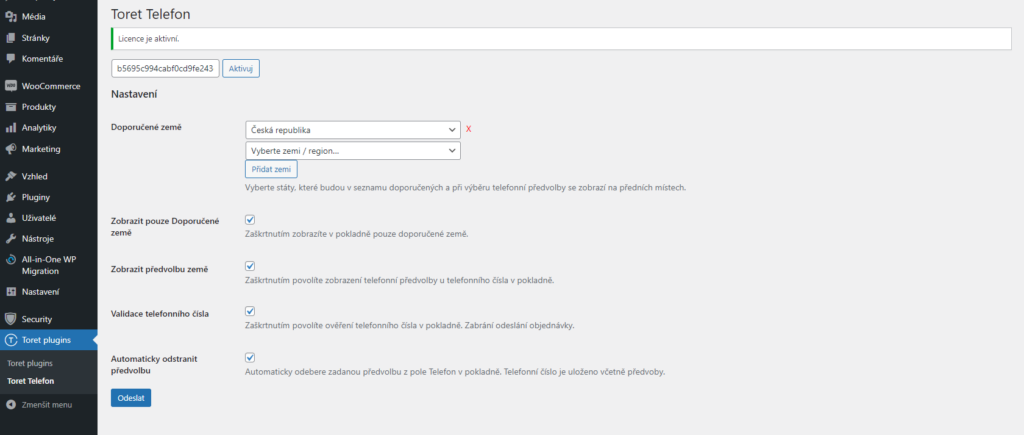
After installing the plugin, open the Telefon plugin (Toret plugins > Telefon), insert the license key into the appropriate field, and click the button to activate.
Plugin Settings
In the plugin settings, you will find these options:
- Recommended countries (Doporučené země) – Select countries that will be in the recommended list and appear at the top when selecting the phone prefix.
- Show only Recommended countries (Zobrazit pouze Doporučené země) – If checked, only countries specified as recommended will be displayed in the checkout.
- Show country prefix (Zobrazit předvolbu země) – Checking enables the display of the phone prefix next to the phone number in the checkout.
- Phone number validation (Validace telefonního čísla) – If checked, the phone number entered by the customer will be verified. If entered in the wrong format, the order cannot be sent.
- Automatically remove prefix (Automaticky odstranit předvolbu) – The entered prefix is automatically removed from the Phone field in the checkout. The phone number is saved including the prefix.
Plugin testing
For testing purposes, you can use:
- the subdomain “dev.domainlicense” (with the same license as for the production website)
- localhost (127.0.0.1)
Purchased plugins will also work in these locations, and you can test their implementation and compatibility here before deploying them to the website and during its use.