
You are on the documentation page for the Price Comparators (Srovnávače zboží) plugin, which allows connecting your e-shop with price comparison engines Heuréka.cz, Heuréka.sk, Zboží.cz and Sklik.cz.
You can purchase the Price Comparators plugin here: Toret Price Comparators for WooCommerce
Plugin Installation
Upon purchasing the plugin, you will receive a license key and a download link for the plugin zip file via email. You can find detailed instructions on how to install the plugin from your computer into WordPress here.
Plugin Activation
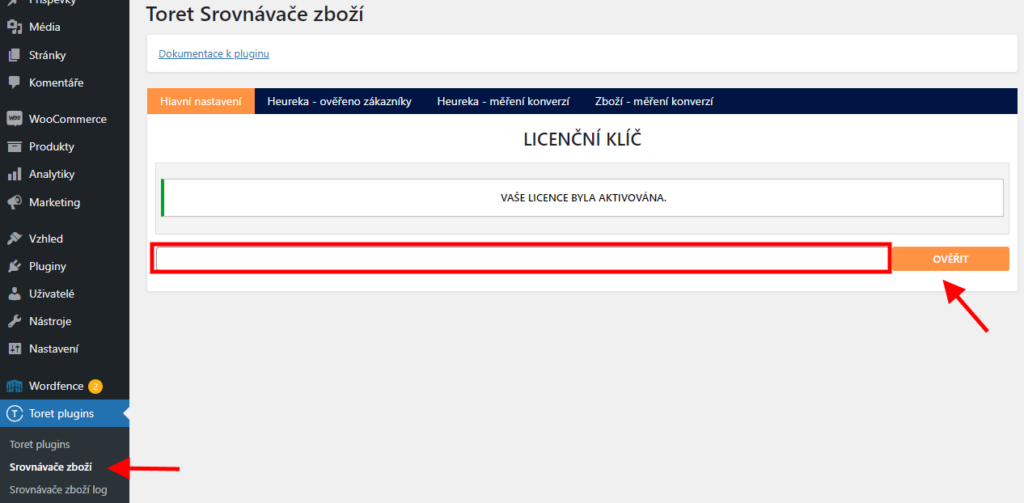
After installation, open the Toret Price Comparators plugin settings, insert the license key into the appropriate field, and click the button to activate.
Heureka – Verified by Customers (Ověřeno zákazníky)
Under the Heureka – Ověřeno zákazníky (Verified by Customers) tab is the implementation setting for this service.
We will go through the settings in a few steps.
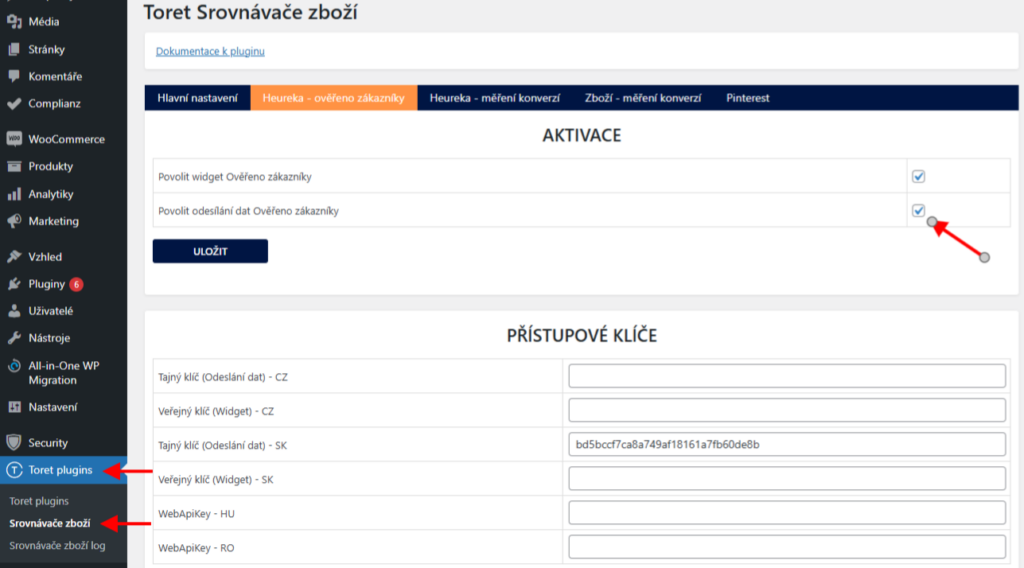
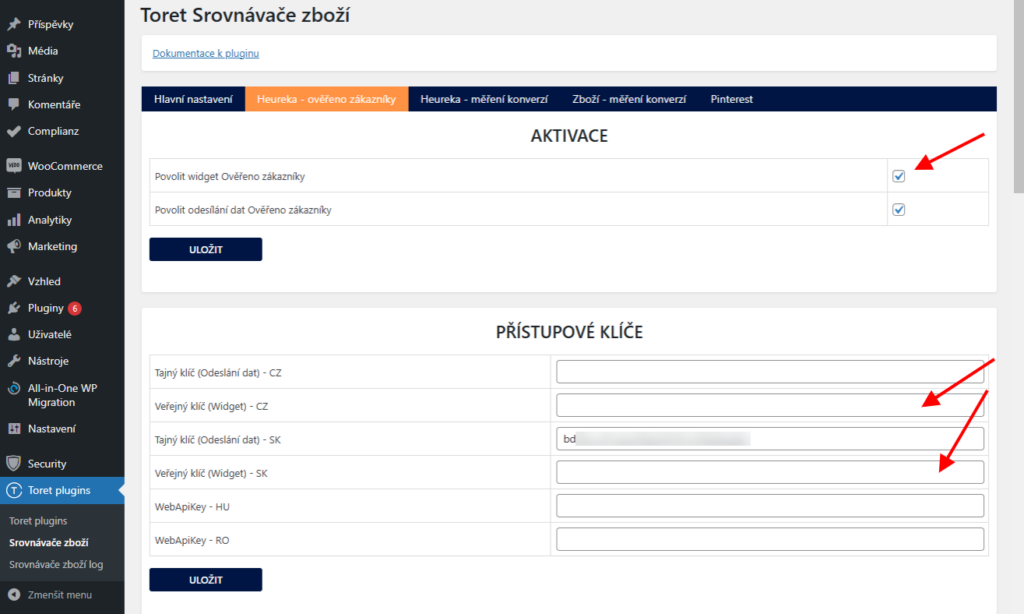
1. First, it is necessary to enable sending data to the Verified by Customers service in the plugin settings (Toret plugins > Srovnávače zboží).
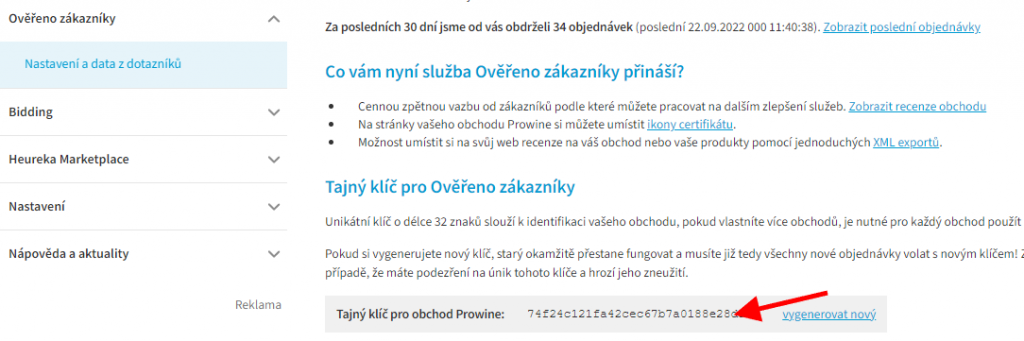
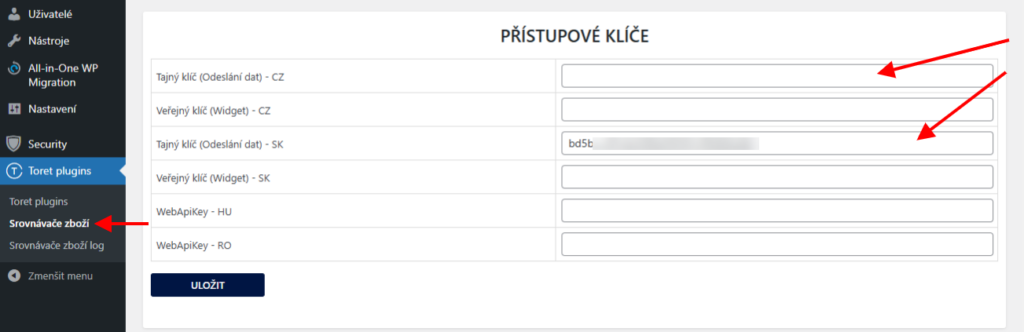
2. By inserting the Tajný klíč (Secret Key) into the appropriate field in the plugin, you connect the data sending with your Verified by Customers account. You can find the secret key in the account administration Heureka → Ověřeno zákazníky (Verified by Customers) → Nastavení a data z dotazníku (Settings and data from questionnaire).
3. If you have already obtained the Verified by Customers Widget from Heureka, insert its public key into the field of the same name in the plugin and enable it in the Aktivace (Activation) part of settings. The public key can be found at Heureka on the same page as the secret key, but it is not directly listed there. It is necessary to open the link “Zde naleznete různé podoby ikon certifikátu Ověřeno zákazníky (Here you will find various forms of Verified by Customers certificate icons)“

After clicking the link, a window with code opens, in which the public key is listed. It is located after the word setKey.

The widget can be obtained from Heureka automatically according to the current rating of your e-shop. If your e-shop does not have or ceases to achieve a sufficient rating for granting the certificate, Heureka will remove it and the widget will automatically stop displaying on your website.
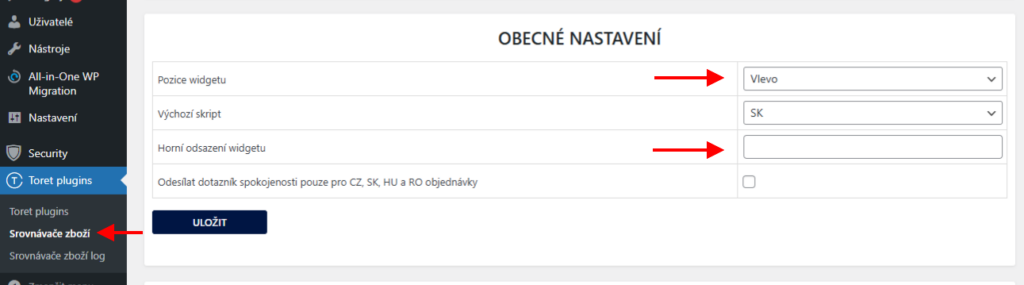
If you already have the widget available from Heureka and set in the plugin, it is possible to set its position on the web in the plugin (Toret plugins > Srovnávače zboží). You can display the widget on the left or right, and also set its offset from the top.
In case you set the widget in the plugin and do not see it on the web, you are probably using an ad blocking extension in your browser. Open the e-shop page in an incognito window or deactivate the ad blocking extension.
In the plugin, it is possible to connect the Verified by Customers service for Czech and Slovak Heureka, Hungarian Arukereso, and Romanian Compari and select the default script in the settings. In case the e-shop is registered with multiple language versions of Heureka, it is possible to insert multiple keys into the plugin.
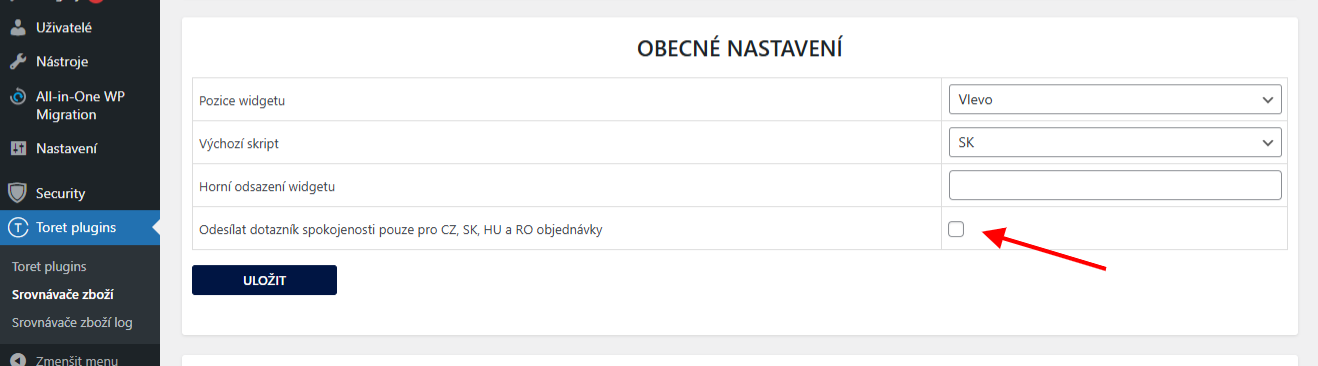
The settings also include the option to send the questionnaire only for CZ, SK, HU, and RO orders.
Heureka – Conversion Tracking (Měření konverzí)
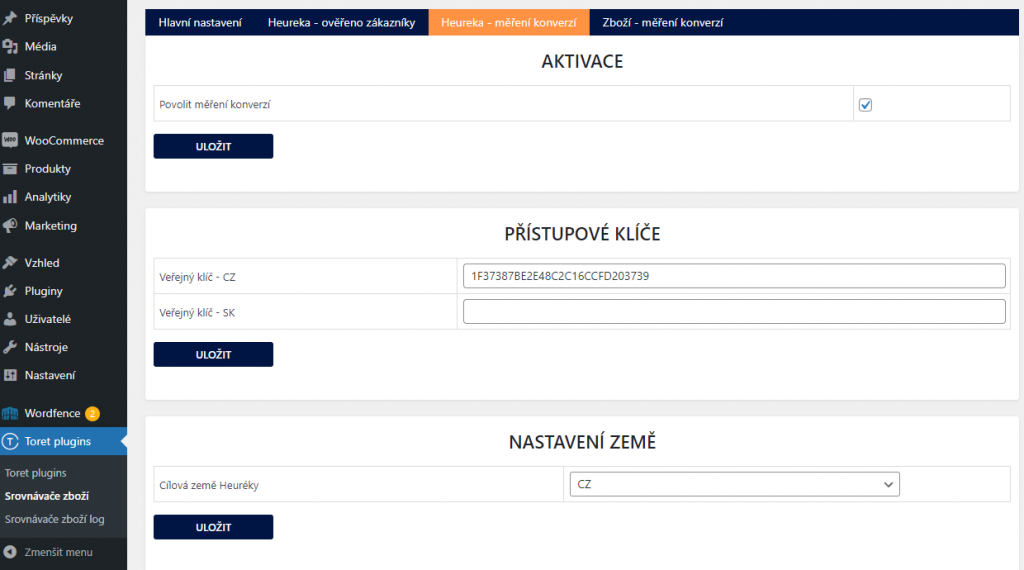
In the Price Comparators plugin, it is possible to set the service of the same name on the Heureka – měření konverzí (Conversion Tracking) tab.
First, it is necessary to enable the service in the plugin and then insert the public key for the conversion tracking code. You can find the key in the account administration Heureka → Statistiky a reporty (Statistics and reports) → Měření konverzí (Conversion tracking).

In the plugin, it is possible to connect conversion tracking for Czech or Slovak Heureka and select the target Heureka country in the settings. If both Heurekas are used on the web, it is possible to set the target Heureka country according to the order, and conversions will be sent according to the customer’s country.
Heureka – Reviews (Recenze)
The Price Comparators plugin offers the option to display Heureka reviews on the website using a shortcode.
For reviews to load, it is necessary to have the Heureka administration Secret Key inserted (see Heureka – Verified by Customers). The Secret Key is in the account administration Heureka > Ověřeno zákazníky (Verified by Customers) > Nastavení a data z dotazníku (Settings and data from questionnaire).
Shortcodes and their settings are in the Price Comparators plugin (Toret plugins > Srovnávače zboží) on the Heureka – ověřeno zákazníky tab.

It is possible to write shop reviews or product reviews. The shortcode is inserted into the page or builder box where reviews need to be written.
Display can be adjusted using attributes:
- page – indicates the displayed page number
- per_page – indicates the number of reviews per page
- limit – indicates the total limit of displayed reviews
Add the selected attribute(s) with a number to the shortcode, see example:
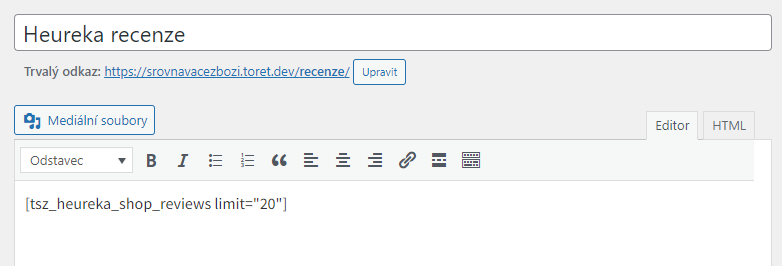
For shop reviews, the layout attribute is also available, which allows setting the display of reviews in a grid or slider. The shortcode can then look like this:
[tsz_heureka_shop_reviews layout="grid"]In addition to inserting the shortcode, it is also necessary to load the reviews, otherwise they would not be displayed on the web. Perform the first load manually by clicking the Aktualizovat (Update) button. Subsequently, we recommend checking the automatic update function so that current reviews are always written to the web.
Instead of the automatic update function, you can use CRON, which you set up on your hosting. You can also find the URL for setting up CRON in the plugin settings.
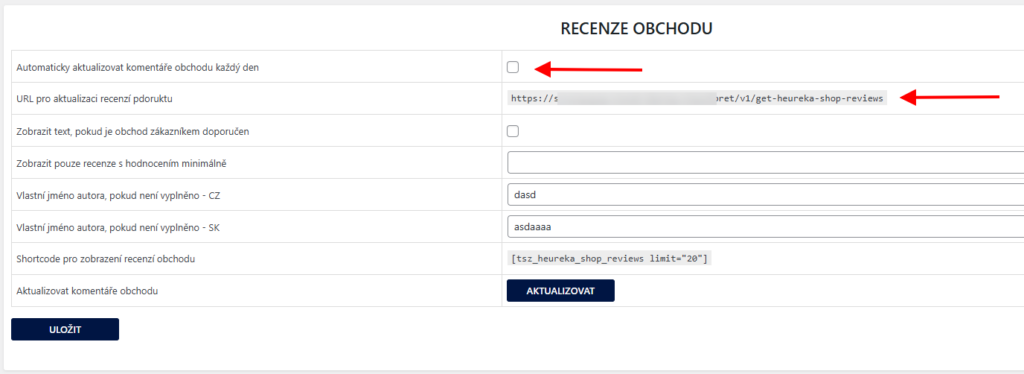
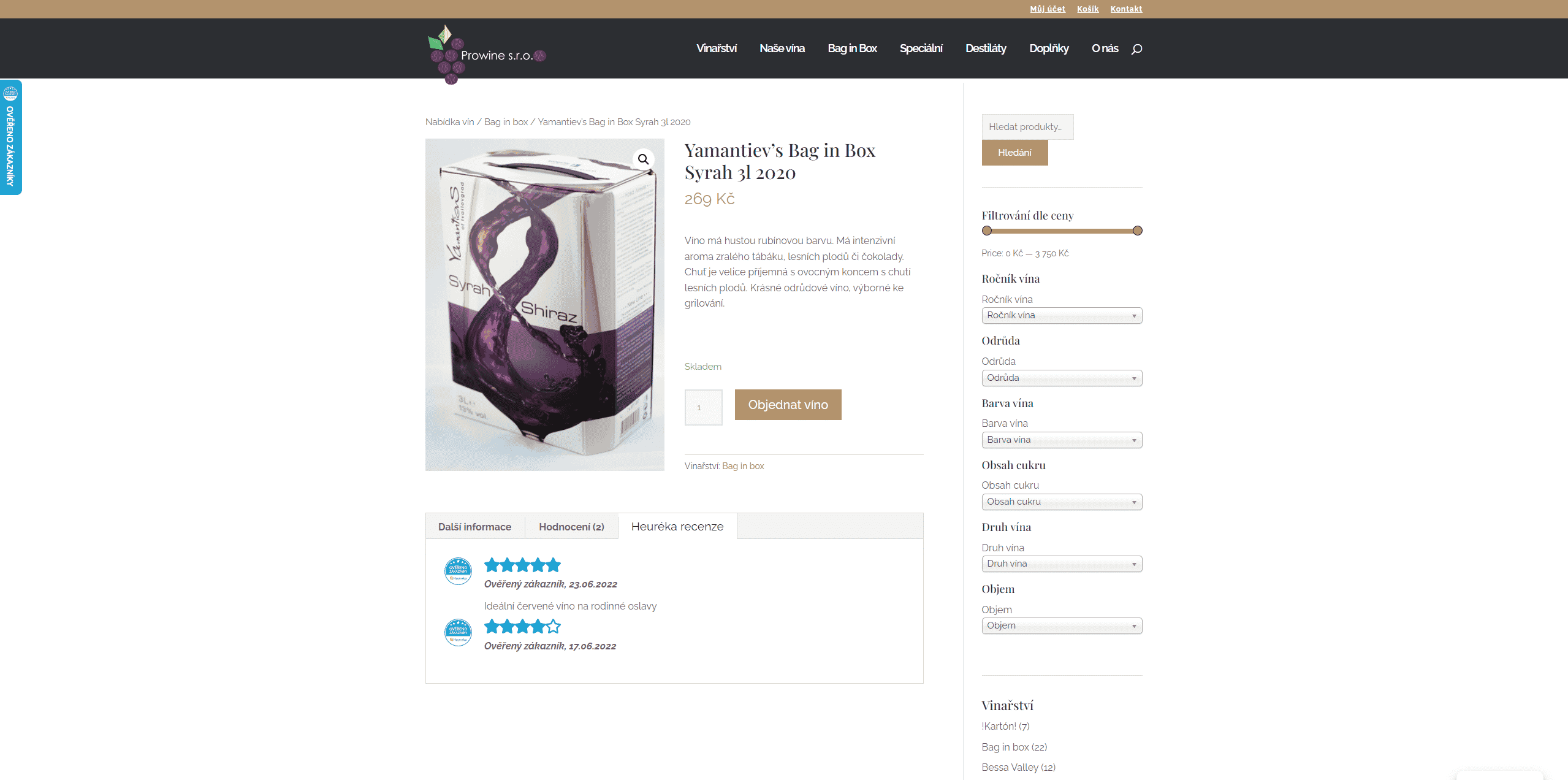
Attention! Product reviews from Heureka can only be loaded 6 months back. Reviews older than 6 months cannot be loaded (Heureka system limitation). To display older reviews, it is necessary to save them and display them on the web as WooCommerce reviews (see Customizing Reviews).
Custom Product Review Tab
The plugin also allows displaying a custom tab with reviews from Heureka on the product page. You perform its setting also on the Heuréka – ověřeno zákazníky (Verified by Customers) > Recenze produktů (Product Reviews) tab. Only reviews less than 6 months old can be displayed in the tab (Heureka system limitation).
To display older reviews, it is necessary to save them and display them on the web as WooCommerce reviews (see Customizing Reviews).
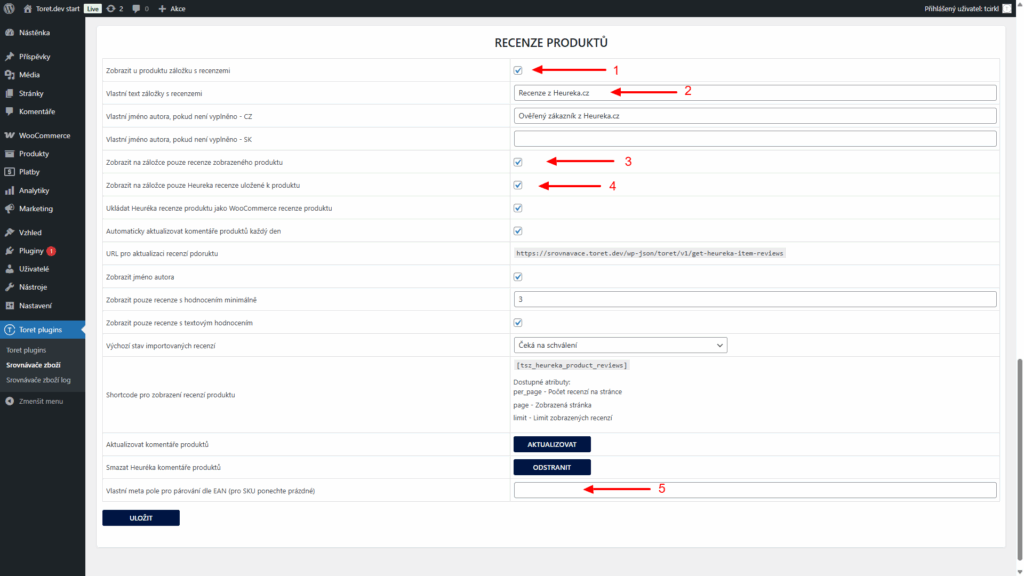
First, it is necessary to enable tab display (1) and enter the tab name (2). If you want to display only reviews related to the given product, check option 3. If you want to display only saved reviews in the tab, activate option 4.
If you use EAN for product pairing, enter the name of the custom meta field in field 5.
Customizing Reviews
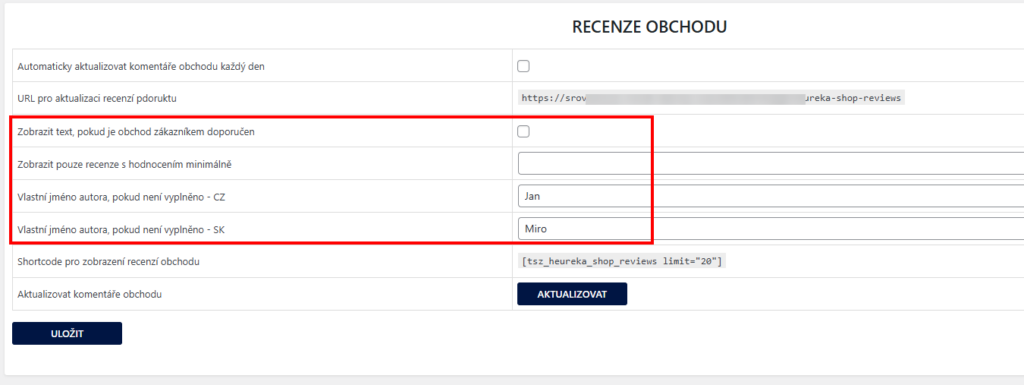
You can further customize both shop and product reviews. Settings can be found in the Heuréka – ověřeno zákazníky (Verified by Customers) > Recenze obchodu (Shop Reviews) or > Recenze produktů (Product Reviews) tab.
For shop reviews you can:
- Display text only if the shop is recommended by the customer
- Display only reviews with a specified minimum rating
- Fill in the author’s name if not filled
- Use a custom icon for reviews – you can find this function above in the General Settings box
For product reviews you can:
- Fill in the author’s name if not filled
- Show/hide author name
- Display only reviews with a minimum rating
- Display only reviews with text
- Save Heureka reviews as WooCommerce reviews (thanks to this, it is possible to display reviews older than 6 months on the web)
- Choose the default status of imported reviews
- Use a custom icon for reviews – you can find this function above in the General Settings box

Zboží.cz – Reviews (Recenze)
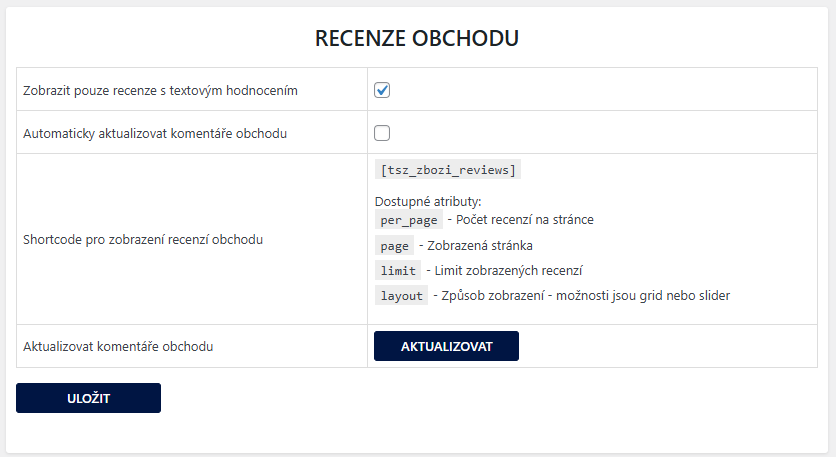
The Price Comparators plugin offers the option to display shop reviews from the Zboží.cz portal to the web using a shortcode. The shortcode and its settings are in the Price Comparators plugin on the Zboží – měření konverzí (Conversion Tracking) tab.
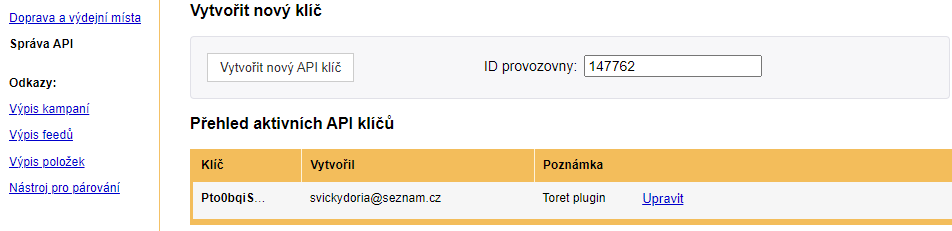
For reviews to load, it is necessary to have the API key and Shop ID (ID provozovny) from the zboží.cz service administration inserted. The API key and Shop ID can be accessed via Správa provozovny (Shop management) → Správa API (API management) → Vytvořit API klíč (Create API key). The created key must be copied; it will not be possible to display it again after closing the window with the key. Next to the Vytvořit API klíč button, the Shop ID (ID provozovny) is listed.
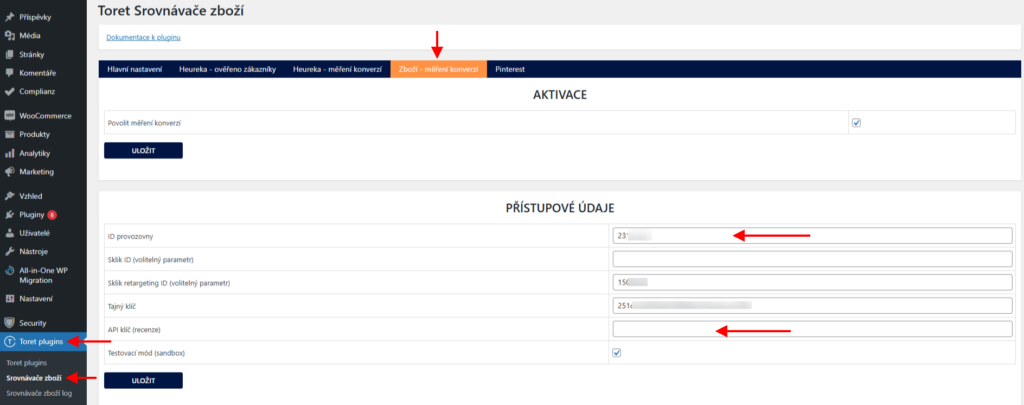
The obtained data must then be inserted into the plugin (Toret plugins > Srovnávače zboží), on the Zboží – měření konverzí (Conversion Tracking) tab.
It is possible to write shop reviews or product reviews. The shortcode is inserted into the page or builder box where reviews need to be written.
Display can be adjusted using attributes:
- page – indicates the displayed page number
- per_page – indicates the number of reviews per page
- limit – indicates the total limit of displayed reviews
Add the selected attribute(s) with a number to the shortcode, see example:
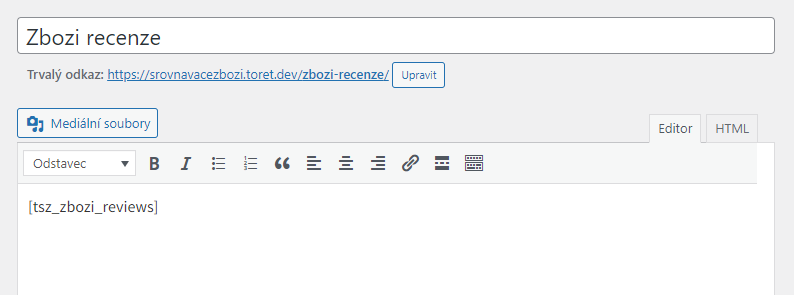
For Zboží.cz shop reviews, the layout attribute is also available, which allows setting the display of reviews in a grid or slider. The shortcode can then look like this:
[tsz_zbozi_shop_reviews layout="grid"]In addition to inserting the shortcode, it is also necessary to load the reviews, otherwise they would not be displayed on the web. Perform the first load manually by clicking the Aktualizovat (Update) button. Subsequently, we recommend checking the automatic update function so that current reviews are always written to the web.
Zboží.cz – Conversion Tracking (Měření konverzí)
In the Price Comparators plugin, it is possible to set the service of the same name on the Zboží – měření konverzí tab.
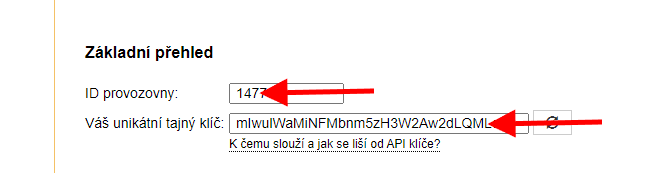
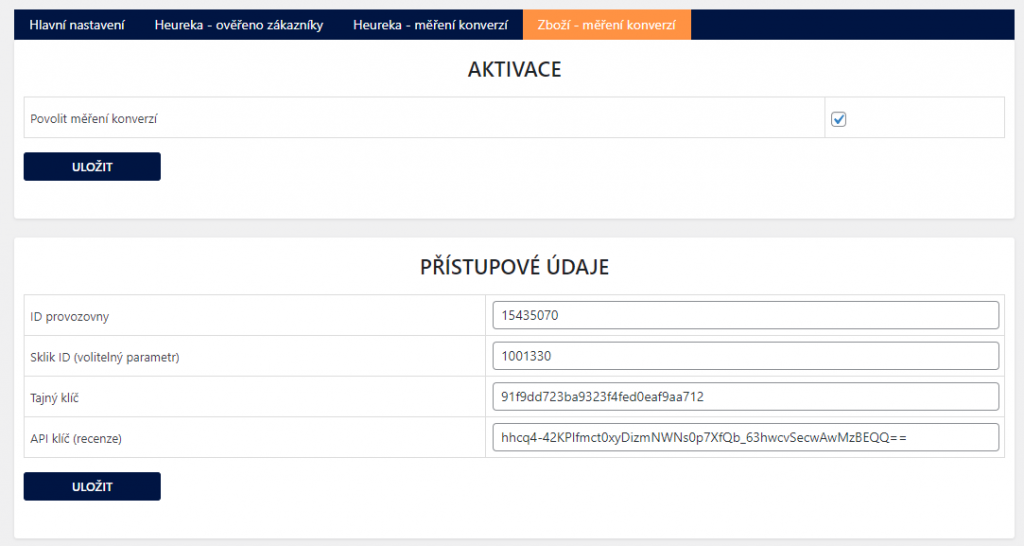
First, it is necessary to enable the service in the plugin and then insert the Shop ID (ID provozovny) and Secret Key (Tajný klíč). The Secret Key and Shop ID can be accessed via zboží.cz administration → Správa provozovny (Shop management) → Měření konverzí (Conversion tracking) → Basic overview section (near the bottom of the page)
Sklik.cz
An optional attribute is setting the Sklik ID. If filled, the conversion will be written to Sklik. The Sklik ID parameter is in the Sklik administration → Nástroje (Tools) → Sledování konverzí (Conversion tracking) → Here it is possible to create a conversion or open an already created one, and in it is the conversion code where the (Sklik) ID is listed.

Testování pluginu
Pro účely testování můžete využít:
- subdoménu “dev.doménalicence” (se stejnou licencí jako pro produkční web)
- localhost (127.0.0.1)
Na těchto umístěních budou zakoupené pluginy fungovat také a můžete zde otestovat implementaci a kompatibilitu před ostrým nasazením na web i v průběhu jeho užívání.